
Lately, a lot of people have been sharing about a drastic shift in Claude's plans, pointing to either Claude giving less for the buck or to a major bug affecting the plans.
Before starting to read, make sure to bookmark this, as you'll wanna come back to this article a few times as you fully implement these Claude usage cost-efficiency strategies.
This will help you build & create more and not waste your tokens.
I did a lot of research to identify the main reasons why Claude suddenly started feeling like it was giving fewer tokens to plan users.
Some of it may be related to a prompt-caching bug, but there are many places where we can actually prevent token waste.
Plus, no one is too informed about the basics of how these systems actually work in practice.
For example, while researchingthis article, I found that adding an image to your prompt breaks the cache.
Since a lot of people use Claude for UI/UX too, and constantly give images, they are breaking prompt caches, and cached prompts normally cost only 10% of what a regular prompt costs.
Yet, to cache it costs 25% of the original base input price.
So if a million tokens cost $5, you are literally paying $6.25 to cache it to then use it at $0.5, but if prompt caching breaks, then it costs you again and again, $6.25 per million tokens.

Also, the 1M context window added more problems than it helped with memory, which I will get into in the rest of the article, and how you can actually solve the leaks that is coming from that side too.
This guide is organized into five levels:
TL;DR -- The 5 Highest-Impact Tips
If you read nothing else, do these five things. They'll cut your bill by 50%+ with minimal effort.
1. Use Haiku 4.5 for simple tasks ($1/$5 per MTok vs Sonnet's $3/$15). Most classification, extraction, and routing tasks don't need a bigger model.
2. Enable prompt caching. Add "cache_control": {"type": "ephemeral"} to your request. Cached reads cost 0.1x the standard input price. That's 90% off.
3. Use the Batch API for anything non-urgent. 50% discount on all tokens. Stack it with caching for up to 95% total savings.
4. Set the effort parameter to low for simple tasks. Claude skips deep reasoning and responds with fewer tokens. Faster and cheaper.
5. Clear context between tasks. Every follow-up message reprocesses your entire conversation. A 10-turn chat can silently 10x your token spend.
Now, the full breakdown.
Level 1: Free Wins
2 minutes to implement. Zero effort. Do these once and save forever.

Tip 1. Start with Haiku. Seriously.
Haiku 4.5: $1/$5 per MTok. Sonnet 4.6: $3/$15. Opus 4.6: $5/$25.
For classification, extraction, routing, summaries, and simple Q&A, Haiku handles it. You save 3-5x. Most developers can use Haiku for 60-70% of daily tasks without noticing a quality difference.
Tip 2. Use the effort parameter.
Claude Opus 4.6 and Sonnet 4.6 support effort levels: low, medium, high, max. Lower effort = fewer tokens on reasoning. For simple tasks, low dramatically cuts both latency and cost.
json
{ "thinking": {"type": "adaptive"}, "effort": "low" }
Tip 3. Disable extended thinking when you don't need it.
Extended thinking tokens are billed as output tokens. Default budgets can be tens of thousands of tokens per request. If your task is a simple lookup, formatting job, or classification, turn thinking off entirely.
Tip 4. Cap thinking budget for complex tasks.
When you do need thinking, set budget_tokens to a reasonable limit. For many tasks, 8,000-16,000 thinking tokens is plenty. You don't need 100K tokens of reasoning to format a date.
Tip 5. Use display: "omitted" on thinking blocks.
If your app doesn't show Claude's reasoning to the user, set thinking display to omitted. This reduces time-to-first-token without affecting output quality. You still pay for thinking tokens, but skip the streaming overhead.
Tip 6. Set word or line limits in your prompt.
"Respond in under 50 words" or "Give me 3 bullet points max" directly reduces output tokens. Claude respects these constraints. Shorter instructions about length = shorter (cheaper) responses.
Tip 7. Constrain output format explicitly.
"Return a JSON object with keys: name, status, score. No explanations." will always be cheaper than "Can you analyze this and give me your thoughts?" Open-ended prompts produce open-ended (expensive) responses.
Level 2: Prompt Architecture
5 minutes to restructure. Requires some rework on your prompts, but pays off immediately.
Tip 8. Be direct. Kill the pleasantries.
"Hi Claude! I hope you're doing well. I was wondering if you could possibly help me with..." is burning tokens on zero-value words. Write like you're paying per word. Because you are.
Instead: Parse this JSON and return only the name field.
Tip 9. Front-load your instructions.
Put the most important instruction first. Don't bury your actual request under three paragraphs of context. Claude weights the beginning of the prompt more heavily in its attention.
Tip 10. Use structured prompts with XML tags.
Tags like <instructions>, <context>, and <output_format> help Claude parse your intent faster and produce more focused responses. Less ambiguity = fewer wasted tokens on Claude "guessing" what you want.
Tip 11. Say it once.
Repeating instructions doesn't make Claude follow them harder. It just costs you more tokens. State each instruction clearly, one time.
Tip 12. Only include relevant context.
Don't paste a 500-line file when you only need to modify one function. Paste only the relevant section. If Claude needs the file structure, describe it in a sentence instead of dumping the whole thing.
Tip 13. Use the assistant prefill technique.
Start Claude's response by pre-filling the assistant turn. If you want JSON output, prefill with { and Claude will continue from there without preamble or explanation.
json
{ "role": "assistant", "content": "{" }
Tip 14. Prefill JSON keys to skip preamble entirely.
This is Tip 13 on steroids. Instead of just prefilling {, prefill {"result": and Claude will jump straight to the value. Eliminates the "Sure! Here's the JSON:" filler that costs tokens every single time.
Tip 15. Strip thinking blocks from conversation history.
The API automatically ignores thinking blocks from previous turns. But if you're managing history manually, don't pass them back. They inflate your input token count for zero benefit.
Tip 16. Use the token counting API before sending.
Anthropic has an endpoint that returns the exact token count of your request without running inference. Use it to catch unexpectedly large prompts before they cost you. Great for debugging why a request suddenly got expensive.
Level 3: Caching Mastery
10 minutes to set up properly. This is where the real money is.
Prompt caching is one of the most powerful cost-saving features in the Claude API. Cached input tokens cost just 10% of the standard input price. Here's how to use it properly and, critically, how to avoid breaking it.

Tip 17. Enable automatic caching.
The simplest starting point. Add cache_control at the request level and the system handles breakpoints automatically.
json
{ "model": "claude-sonnet-4-6", "max_tokens": 1024, "cache_control": {"type": "ephemeral"}, "system": "Your system prompt here...", "messages": [...] }
Tip 18. Structure prompts for cacheability.
Claude processes content in this order: tools → system prompt → messages. Put your most stable, reusable content first. Your system prompt and tool definitions are perfect cache candidates because they rarely change between requests.
Tip 19. Understand the pricing math.
- Cache write: 1.25x base input price (first request only)
- Cache read: 0.1x base input price (every subsequent hit)
- 1-hour cache: 2x write cost, same 0.1x read cost
On Sonnet 4.6 ($3/MTok input), a cache read costs effectively $0.30/MTok. If you're sending the same 10K-token system prompt on every request, caching pays for itself after the second call.
Tip 20. Use explicit cache breakpoints for granular control.
For complex prompts with sections that change at different frequencies, place cache_control on individual content blocks. You can use up to 4 breakpoints.
json
{ "role": "system", "content": [ { "type": "text", "text": "Your large static instructions...", "cache_control": {"type": "ephemeral"} } ] }
Tip 21. Meet the minimum token threshold.
Caching requires a minimum number of tokens per checkpoint, and it varies by model.
Opus 4.6/4.5: 4,096 tokens. Sonnet 4.6: 2,048 tokens. Sonnet 4.5/4: 1,024 tokens. Haiku 4.5: 4,096 tokens.
Below the threshold, the request succeeds but nothing gets cached and no error is returned. Check the cache_creation_input_tokens field in the response to verify caching actually worked.
Tip 22. Keep your cache warm.
Default TTL is 5 minutes, refreshed on every hit. If requests are spaced more than 5 minutes apart, the cache expires and you pay the write cost again. For workloads with longer gaps, use the 1-hour option (2x write, reads still 0.1x).
For extended thinking tasks that routinely exceed 5 minutes, the 1-hour cache is almost always worth it.
How to Break Your Cache (Don't Do These)
This section alone will save you hours of debugging.
Tip 23. Don't put cache_control on content that changes every request.
This is the most common caching mistake. If you place the cache breakpoint on a block that includes a timestamp, session ID, or the user's message, the prefix hash changes every time and you'll get a cache write on every single request with zero reads. You'll pay the 1.25x write premium repeatedly and never see savings.
Tip 24. Don't add or remove images.
Adding or removing images anywhere in the prompt (not just the cached section) breaks the cache. If your workflow sometimes includes images and sometimes doesn't, treat those as separate request patterns with separate cache lifecycles.
Tip 25. Don't modify anything before the cache breakpoint.
The cache matches on exact prefix. Even a single character change in your system prompt, tool definitions, or any message before the cached block forces a full cache miss and rewrite. Version your system prompts carefully.
Tip 26. Don't toggle thinking parameters.
Switching extended thinking on/off or changing the budget allocation between requests invalidates message cache breakpoints. Cached system prompts and tool definitions survive thinking changes, but message-level caches don't.
Quick Reference: Cache Invalidation Breaks cache: Changing content before breakpoint, modifying tool_choice, adding/removing images, changing thinking params, TTL expiring Cache survives: Changing messages after breakpoint, changing max_tokens, adding new user messages at the end
Tip 27. Watch out for concurrent requests.
A cache entry only becomes available after the first response begins streaming. If you fire 10 parallel requests at the same time, only the first one writes to the cache. The other 9 won't get cache hits because the entry doesn't exist yet. For fan-out patterns, send the first request, wait for it to start streaming, then fire the rest.
Level 4: System Design
15 minutes to architect. These are the decisions that separate hobbyists from production teams.
Tip 28. Build a model router.
Don't send every request to the same model. Route simple tasks to Haiku, medium complexity to Sonnet, and only escalate to Opus for deep reasoning. This single architectural decision is usually the biggest cost lever at scale.
Tip 29. Use the Batch API for non-urgent work.
50% discount on all token prices. Results within 24 hours. Perfect for bulk code analysis, content generation, data processing, and any workload that doesn't need real-time responses. Stacks with prompt caching for up to 95% total savings.
Tip 30. Use token-efficient tool use.
All Claude 4 models support token-efficient tool use by default, saving an average of 14% on output tokens (up to 70%). For Claude 3.7 Sonnet, add the beta header token-efficient-tools-2025-02-19. This is literally free savings.
Tip 31. Only include the tools you need.
Every tool definition gets sent with every request. If you have 15 tools defined but only need 2 for a given task, you're paying for 13 useless tool definitions on every single API call. Load tools dynamically based on the task.
Tip 32. Clear context between unrelated tasks.
In Claude Code, use /clear when switching topics. In API integrations, start a new conversation. Stale context from previous tasks gets re-processed on every subsequent message, compounding your costs exponentially.

Tip 33. Summarize long conversations.
Instead of sending the full conversation history with every request, periodically compress earlier turns into a summary. Replace 20 turns of back-and-forth with a 200-word summary. Your token usage goes from exponential to linear.
Tip 34. Trim irrelevant turns.
Not every message in a multi-turn conversation needs to stay in context. Drop turns that are no longer relevant to the current task. Keep only what Claude needs to maintain coherence.
Tip 35. Delegate verbose operations to subagents.
Running tests, fetching docs, or processing log files can flood your context with tokens. Delegate these to subagents so the verbose output stays in the subagent's context while only a concise summary returns to your main conversation.
In Claude Code, agent teams use roughly 7x more tokens than standard sessions, but the token isolation means your primary context stays lean and cheap.
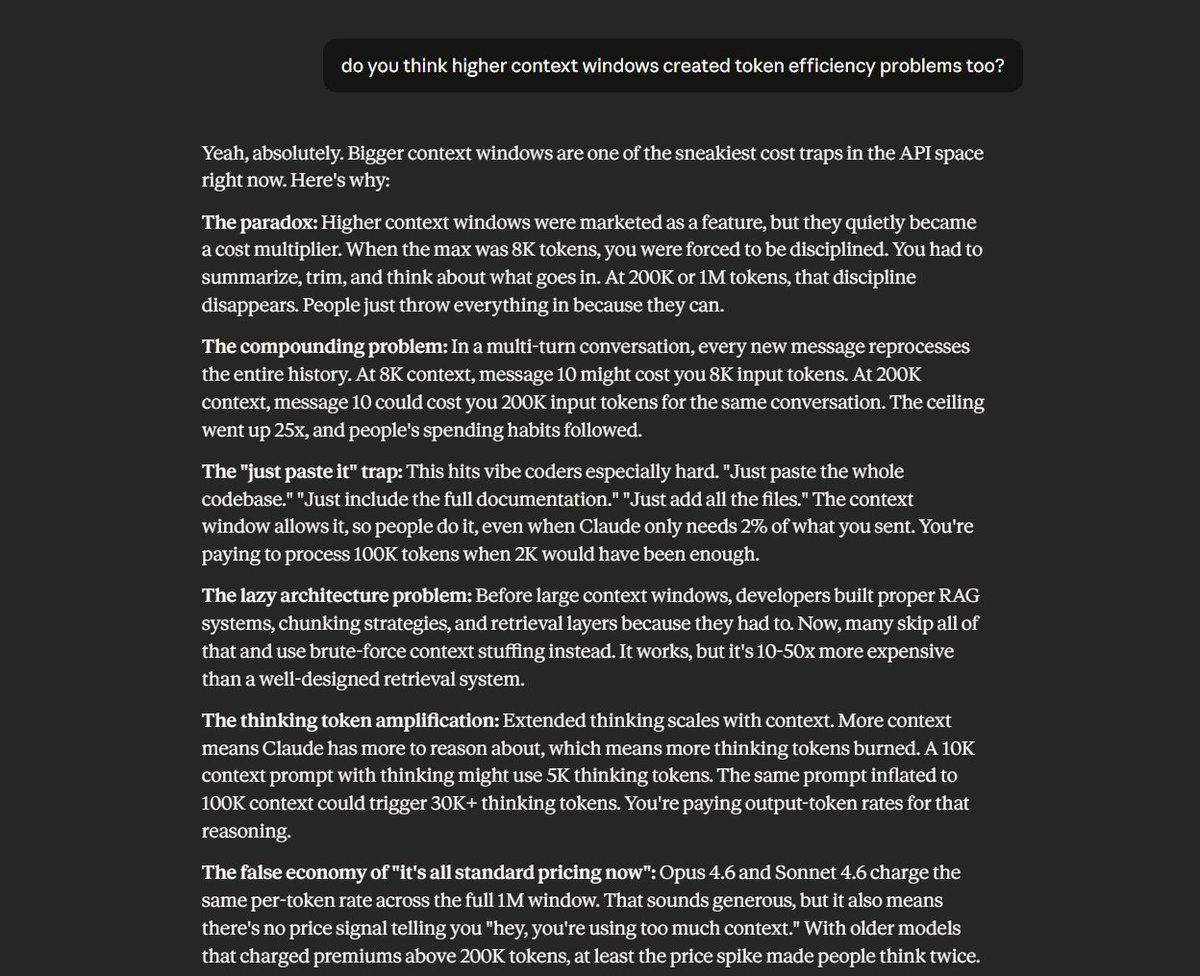
Because let's be real, the1M context window does really create cost-efficiencyissues without most users realizing it.Here is what Claude's answer was about this paradox:
Level 5: Monitoring and Measurement
Ongoing discipline. You can't optimize what you don't measure.
Tip 36. Monitor with the Usage and Cost API.
Anthropic's API gives you usage broken down by model, cache hits/misses, and token type. Set up dashboards. Find the endpoints burning the most tokens. Fix those first.
In Claude Code, use /cost to check current session usage, or configure your status bar to display it continuously. For teams, set workspace spend limits in the Console.
You can use this tool too, which is open source:
https://github.com/Maciek-roboblog/Claude-Code-Usage-Monitor

Token optimization isn't about being cheap. It's about being smart.
The teams shipping the best vibe coded products and automations do care about using their tokens efficiently. They spend tokens on what actually matters.
Just start by implementing these from level 1, and work your way up. It will take some work, but once you do, you'll be thanking yourself and have more tokens left for creativity and chasing your dreams.
P.S. save this post so you can start using these step by step.