(All 14 prompts are copy-pasteable at the bottom of the article. I'd recommend reading the workflow first, but I'm not your dad.)Yesterday I tested whether the new ChatGPT image model 2.0 could pre-produce an entire cozy mobile game from prompts alone. Then I figured out how to turn the screens into real, usable assets.
Worth noting upfront: I did all of this on the free version of ChatGPT. No paid plan, no API credits, no special access. If you have a free OpenAI account, you have everything you need to run this whole workflow tonight.
Here's the full workflow.

The problem
Every side project I start, I burn time mocking things up in Figma just to find out the vibe doesn't work.
Mock up the home screen. Mock up a character. Mock up a level select. Spend hours on it after the girls go to bed, look at it the next morning while making coffee, realize the idea isn't actually as charming in execution as it was in my head, and quietly close the file.
This has happened maybe ten times in the last two years. Ten lost evenings I'll never get back, all on ideas that died in pre-production because I committed before I could really see them. I work on side projects pretty much every night, 8pm to 2am, after the day job and the girls and dinner and bath time. That window is sacred and I'm tired of wasting it.
A few days ago I posted a thread about a ChatGPT prompt that generates app mockups. It did better than I expected (a lot of bookmarks, a lot of replies, a lot of people asking the same follow-up question: "okay but what do you actually do with these screens?"). I was going to try to answer that question. I'd been using the prompts for vibe checks, not real workflow.
This section contains an embedded post. View on X
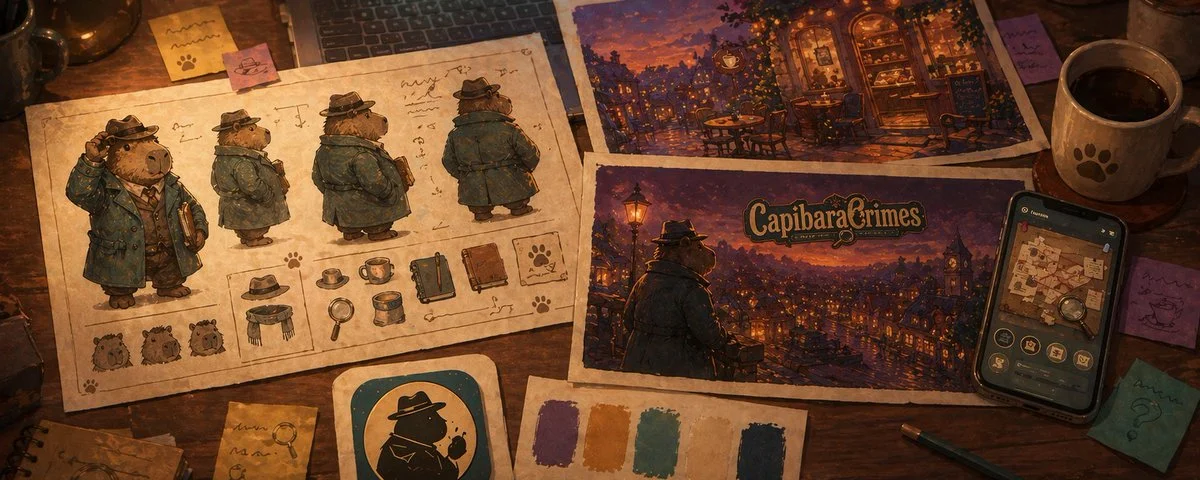
So yesterday I tried to answer the question for myself. Instead of opening Figma, I opened ChatGPT and started fleshing out a full game concept (a cozy detective puzzle game called CapibaraCrimes) using nothing but prompts and the new image model 2.0. Then I figured out how to actually turn the screens into usable assets.
A few hours later I had a complete pre-production package: characters, screens, world, marketing, even an audio direction for an imaginary composer. By the end of the day I knew whether this could be done yes or no.
Spoiler: you can do this!

Why the new image model 2.0 changes this
I've been messing around with AI image generation for a while now and the previous models were genuinely not good enough for app mockups. Phones came out stretched. Mascots looked generic. Multi-character compositions fell apart. You could get a vibe but not a usable visual.
ChatGPT's new image model 2.0 is the first one I've used where the output is actually directional enough to make real decisions on. Phone proportions hold. Color palettes stay consistent across runs. Characters look like characters. Multi-element compositions (4 screens in a row, character sheets, world environments) actually hang together visually.
That shift is what made this whole experiment possible. Six months ago this article wouldn't exist because the outputs would've been too rough to learn anything from.
What "flesh out a concept" actually means
Before getting into the prompts, the framing matters. A mobile game concept doesn't fail because the code is hard. It fails because one of these is true:
The protagonist isn't actually a character yet, just a placeholder. The world feels like a few screens, not a place. The brand identity hasn't crystallized. The marketing hook doesn't write itself. The whole thing visually drifts when you try to imagine it.
You can't catch any of those with a feature list. You catch them with visuals you didn't have before. ChatGPT 2.0 is shockingly good at exactly this: making a vibe real enough to evaluate honestly.
That's the whole point of what's below. Move from "I have an idea" to "I have a real concept" in a few hours instead of a month. Replace months of pre-production work, or skip the design phase entirely if you're a solo builder shipping it yourself. Whichever you need.
The 12 prompts, in three groups
I broke the workflow into three categories, each answering a different validation question.
Group 1: The look (does the game have a visual identity?)
The 4-screen feature mockup. Does the gameplay vibe even work as an app? Generates four iPhone screens showing the game's core moments: dashboard, main interaction, reward state, progress view. If this sheet feels cohesive and exciting, the gameplay loop has visual potential.

The onboarding flow. Does the first impression invite people in? Three screens showing welcome, promise, and personalization. If onboarding doesn't make me want to keep playing in a 3-screen mockup, no amount of feature work will save it.

The character sheet. Is the protagonist actually a character? Hero pose, expression sheet, pose variations, color reference. If the prompt comes back generic three runs in a row, the character is thin and you need to write more before continuing.

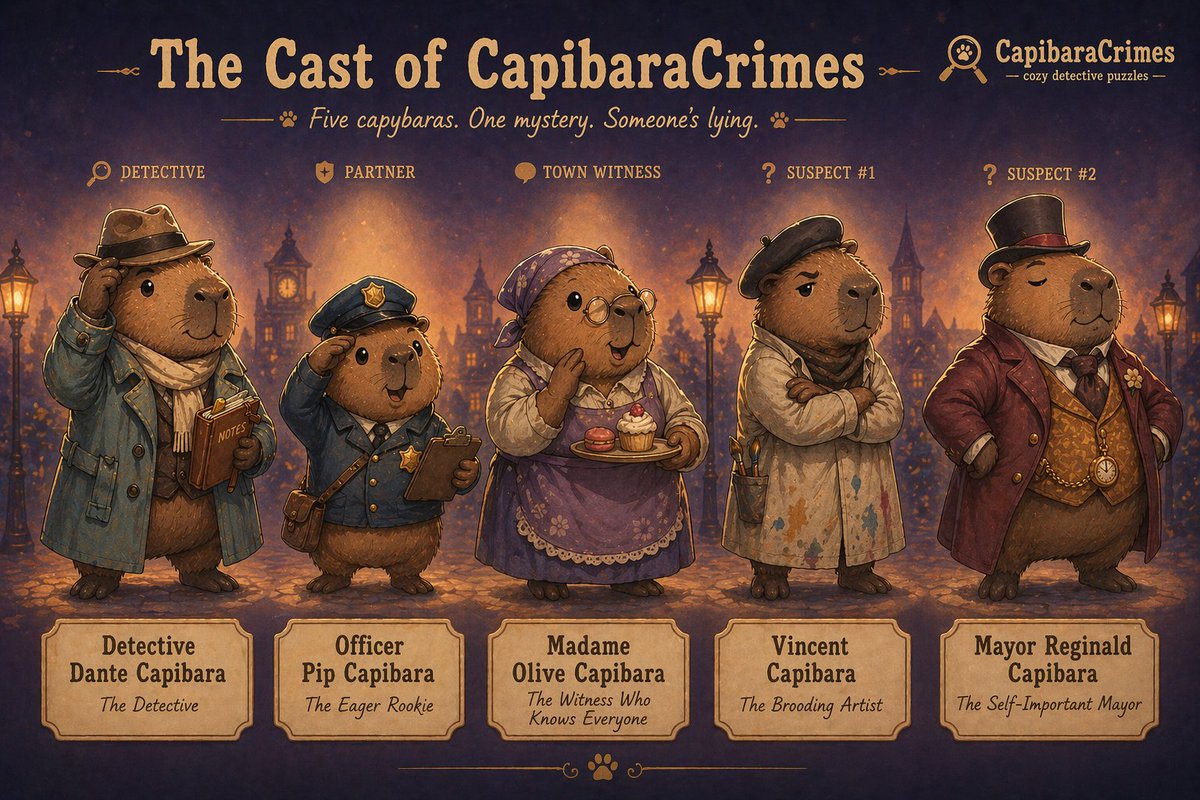
The cast sheet. Does the world have multiple personalities? Five characters in a lineup, each with a personality tag. If they all look the same with different hats, your world is one-note.
The environment sheet. Is your world actually a world? Six locations in a grid, all sharing palette and lighting. If they don't hang together, you have a few screens, not a setting.

The props sheet. What does the world contain? Sixteen objects from the game in a reference grid. This one's underrated. It forces you to think about what items live in your game, which is the difference between "an idea" and "a place you could spend time."

Group 2: The brand (will anyone download this?)
App icon variations. Six icon directions side by side. The character-led version vs. the symbol version vs. the cinematic silhouette. Pick the one that wins at 60×60 pixels.

Logo & typography sheet. Wordmark, lockups, type system. Treats the game like a real brand instead of a placeholder.

Marketing hero screenshot. The App Store feature-slot image. Phone tilted, mascot peeking out, big headline. If you can't write a 5-word headline that sells the game, the concept isn't sharp enough yet.

First-look teaser. Single cinematic hero art piece. The "Steam page reveal" image. If this looks magazine-worthy, you've got real visual identity. If it looks generic, your game has the same.

Group 3: The bonus prompts (text outputs, not images)
Audio mood brief. A text prompt that asks ChatGPT to act as a game audio director and produce a complete sonic identity document for the game. Not music. A brief you'd hand to a real composer.
The output is long (mine ran two pages) and covers: the overall sonic identity, main theme direction, location-specific ambiences for every game location, UI sound personality, voice direction for characters, what to avoid, and a reference playlist of 10 real-world tracks. Specific enough that a real composer could write within an hour of reading it.
The line that made me realize the prompt actually worked:
"Era influence leans mid-century noir softened through modern indie game scoring — like a 1940s detective score reimagined through a hygge lens."
Marketing copy variations. Text prompt that generates App Store copy in four registers (cozy, witty, mysterious, smart/literary), each with headline, subtitle, and social hooks. Then asks ChatGPT to recommend which register fits best and explain why. Forces clarity on tone before any real marketing work begins.
The most useful part wasn't any single line. It was seeing the four registers side by side:
Cozy & warm: "Unwind with a Cozy Mystery" Wry & witty: "Yes, They're All Capybaras" Mysterious & atmospheric: "A Quiet Town. Subtle Secrets." Smart & literary: "Think Carefully. Everyone Has Tells."
Same product. Four completely different audiences. And once you see them next to each other, two of them die instantly.
ChatGPT recommended Cozy & Warm as the strongest fit. I disagreed. Wry & Witty had way more personality and was the only one that didn't sound like five other cozy mobile games. The fact that I could push back on the AI's recommendation, with reasons, was the proof the prompt actually worked. It gave me something to think against, not just options to copy.
What CapibaraCrimes told me about CapibaraCrimes
Running these on a real concept revealed things I wouldn't have caught in Figma.
Detective Dante took three runs to come alive. First two attempts were generic capybaras in coats. The third run, when I got specific in the prompt ("rumpled trench coat, tiny fedora, warm curious eyes, a small leather notebook always in paw"), produced a character I actually wanted to spend time with. That moment told me the protagonist wasn't yet developed enough in my own head, and the prompt forced me to make him real.
The cast sheet broke and that was useful. Generating five distinct capybaras in one image is hard, even for the new model. First three runs came back with characters that looked too similar. That wasn't an AI failure. It was the concept telling me I needed to differentiate my supporting cast more clearly, in writing, before any real design started.
The environments hung together immediately. Six locations, one palette, one mood. That was the moment I knew CapibaraCrimes had a world and not just an aesthetic. If the café and the alley and the parlour all felt like the same place at first try, the world had legs.
The audio brief was the biggest surprise. Asking ChatGPT to act as a game audio director produced two pages of specific direction. Warm clarinet over soft jazz brushes, tempo around 88bpm, references to real-world scores. That's a real brief. Real enough that I could send it to a composer Monday morning.
The marketing copy in four registers immediately killed two of them. "Smart & literary" sounded great but didn't fit a cozy mobile game. "Mysterious & atmospheric" worked for a Steam page but not for App Store. "Wry & witty" was the winner, and seeing it next to the alternatives is what made that obvious. I never would have arrived at that confidence without comparing.
In a matter of 2 hours I had a folder full of pre-production assets, a clear visual identity, a name for my detective, a marketing direction, and a brief that could go to a real composer. Total time: about 2 hours, mostly retries.
From mockups to individual assets
The question I've been getting most: "They look great, but they're just images. How do you turn them into real app assets?"
Honest answer: extracting clean assets from a finished mockup is still hard. Splitting a flat image back into isolated mascots, icons, and components is something AI tools are getting better at, but it's not a clean one-click process yet. I've been experimenting with it. It's not there.
But here's what does work, today: skip the extraction entirely and generate the assets individually.
ChatGPT 2.0 is consistent enough across runs that you can ask it for a single mascot, a single prop, or a full asset sheet on a transparent background; and get something you can drop straight into Figma. No extraction, no cleanup pipeline, no reverse-engineering a flat mockup. Just generate the parts directly.
This is the workflow I've been spending most of my time on lately. Two prompts cover most cases:
Prompt 13: Single asset on transparent background. When you need one specific thing; the mascot in a hero pose, a single prop, a UI element. Run it, get a clean isolated asset, drop it in Figma.

Prompt 14: Asset sheet on transparent background. When you need a batch; all 16 props at once, all 5 cast members in a row, all UI icons together. One generation, sixteen ready-to-extract assets. This is the version I've been using most.

Once you've got assets, the path forward depends on what you're building:
For real production: clean them up in Figma, build component libraries, design the rest of the app around them. Same as you would with any starting visual direction.
For fast prototyping: drop them into Claude Code with your spec, let it scaffold working components, iterate from there. Still imperfect, still requires cleanup, but it's a real shortcut.
The complete-mockup-to-working-app pipeline isn't here yet. But generating individual assets that you can actually use? That's working today, and it's enough to start building with.
I'll write more about this as I push it further. If you've found a workflow that works for you, I'd love to hear it.
What AI got right
Vibe and mood, immediately. First runs got the warm-dusk-cozy-detective feeling fast.
Character archetypes, with enough prompting specificity. The new model holds character details much better than older ones.
Color cohesion across outputs, when I ran prompts in the right order and attached reference images.
Atmospheric environments. The painterly Stardew-meets-Ghibli look came out reliably.
Written briefs for non-visual aspects (audio, copy) that were genuinely useful.
What AI got wrong (and what it can't replace) YET*
Text in images is still imperfect, even on 2.0. Headlines look better than they used to but logos can drift. Treat any text in the output as a placeholder for real Figma work.
Five+ characters in one frame still drifts. The cast sheet is the hardest prompt; expect retries.
Continuity between runs without reference images. Dante looks like Dante in the character sheet, but he can drift in the next prompt unless I explicitly attach the previous image.
Game mechanics, story, dialogue. These are still your job. AI can't tell you whether a puzzle is fun or a story has stakes. It can only tell you whether the vibe of solving puzzles in this world is appealing.
The line that matters: AI didn't design my game. AI helped me find out, in a few hours, whether the game was worth designing.
The order matters more than the prompts
If I had to give one piece of advice to someone trying this: run the prompts in this order and attach previous outputs as references when generating later prompts.
- Character sheet first (locks in the protagonist's visual language)
- Cast sheet next (extends the character vocabulary)
- Feature mockups (now your screens have a consistent character to populate them)
- Environments (now your world has a place to live)
- Props (objects that match the world)
- Logo & typography (now you've seen enough to know what the brand should feel like)
- App icons (informed by the logo)
- Marketing hero & teaser (uses everything above)
- Audio brief & copy (text-based, can run any time but most useful at the end when the visuals are settled)
The wrong order produces visual drift. The right order produces a coherent kit.
What this actually changes
This isn't replacing designers, artists, composers, or writers at studios that have them. Those teams will keep doing what they do.
What it does is meaningfully different: it gives solo devs, solo founders, and indie hackers the capability to ship complete mobile apps without a team. Not a janky prototype. A real app with a coherent visual identity, a defined character, a marketed brand, and the assets to back it up.
That's the actual shift. The bar to ship a full, polished mobile app used to be either "have a co-founder who designs" or "have $10K to spend on contractors." Both gates are now optional. One dev at his home office after the girls go to sleep can now produce something that looks and feels like a studio made it. (I would know. I'm typing this at 02:42am with a red-bull in my hand 😅.)
The ideas that work get the full treatment. The ideas that don't work get dropped after an afternoon of prompts instead of three months of sunk cost.
That changes who gets to build, and how many things they get to try before something hits.
The 14 prompts
Below are all 12 prompts I used, ready to copy and run on your own game concept. Swap CapibaraCrimes, Detective Dante, and the cozy detective theming for your own idea.
Prompt 1: Feature mockup sheet (4 screens in a row)
This section contains content that couldn't be loaded. View on X
Prompt 2: Onboarding flow (3 screens in sequence)
This section contains content that couldn't be loaded. View on X
Prompt 3: Detective Dante character sheet
This section contains content that couldn't be loaded. View on X
Prompt 4: Full cast character sheet
This section contains content that couldn't be loaded. View on X
Prompt 5: Environment / world reference sheet
This section contains content that couldn't be loaded. View on X
Prompt 6: Props & items reference sheet
This section contains content that couldn't be loaded. View on X
Prompt 7: App icon design sheet (6 variations)
This section contains content that couldn't be loaded. View on X
Prompt 8: Logo & typography sheet
This section contains content that couldn't be loaded. View on X
Prompt 9: Marketing hero screenshot
This section contains content that couldn't be loaded. View on X
Prompt 10: First-look teaser / hero art
This section contains content that couldn't be loaded. View on X
Prompt 11: Audio mood brief (text prompt — produces a written brief)
This section contains content that couldn't be loaded. View on X
Prompt 12: Marketing copy variations (text prompt — produces written copy)
This section contains content that couldn't be loaded. View on X
Prompt 13: Single asset on transparent background
This section contains content that couldn't be loaded. View on X
Prompt 14: Asset sheet on transparent background (batch)
This section contains content that couldn't be loaded. View on X
If you're a solo builder with an idea you've been sitting on, this is the kit. Drop what you make below. I'd genuinely like to see what kitchen-table mobile apps look like in 2026. And the wildest part: the entire workflow above runs on free-tier ChatGPT. The bar isn't just lower, it's effectively zero.