Out of the box, OpenClaw is a chatbot with a Telegram interface. Nothing more. The other 95% unlocks when you understand what the system actually is - and configure it accordingly. Obsidian. Groq. Skills.
Here's the complete architecture.
What OpenClaw actually is.
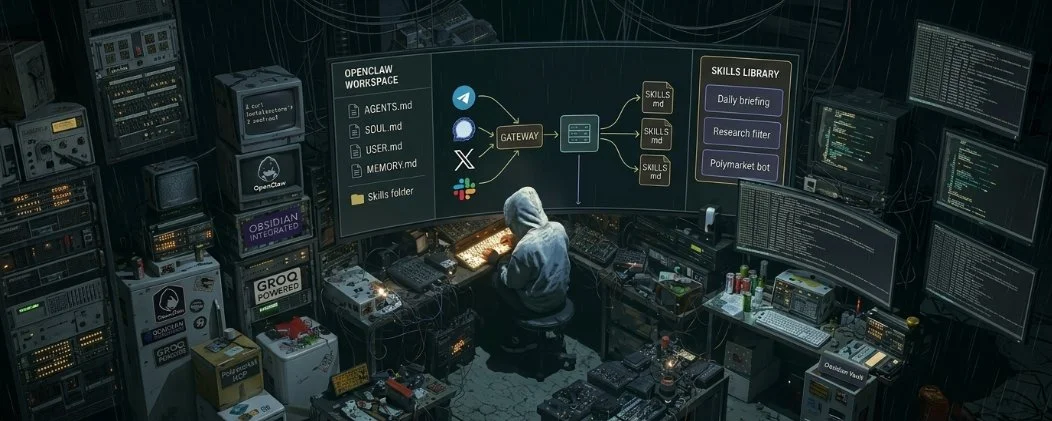
Not a smarter ChatGPT. An infrastructure layer that takes any language model, connects it to your data and applications, and runs tasks autonomously - on a schedule, without you.
Three components make it work:
The Gateway maintains persistent connections to Telegram, WhatsApp, Discord. Every message routes through it. Every tool call executes here. Stop the Gateway - everything dies.
The Workspace is a folder of Markdown files that becomes the agent's permanent memory. Without it, the agent wakes up blank every session. With it - it knows your projects, your rules, your decisions from three weeks ago.
Skills are the hands. Plain text .md files in ~/.openclaw/skills/ that tell the agent exactly how to handle specific tasks. One skill per workflow. No code required.
Install takes one command:
curl -fsSL https://openclaw.ai/install.sh | bash
Node.js 22+, 4GB RAM. Runs on a laptop, VPS, Raspberry Pi, or Mac Mini. No Mac Mini required - that's a myth.
The workspace files that separate a dumb bot from a real agent.
AGENTS.md - the operating manual. How to think, which tools to use, what rules to follow. This is what the agent reads before every single response.
SOUL.md - personality and tone. Brief, direct, no unsolicited advice — put it here.
USER.md - your profile. Who you are, what you do, how you communicate.
MEMORY.md - long-term memory. Facts the agent must never lose. Decisions, rules, context.
HEARTBEAT.md - periodic checklist. Every 30 minutes Gateway wakes the agent: check email, monitor positions, run the checklist.
YYYY-MM-DD.md - daily logs. Tomorrow the agent opens yesterday's file and picks up exactly where you left off.
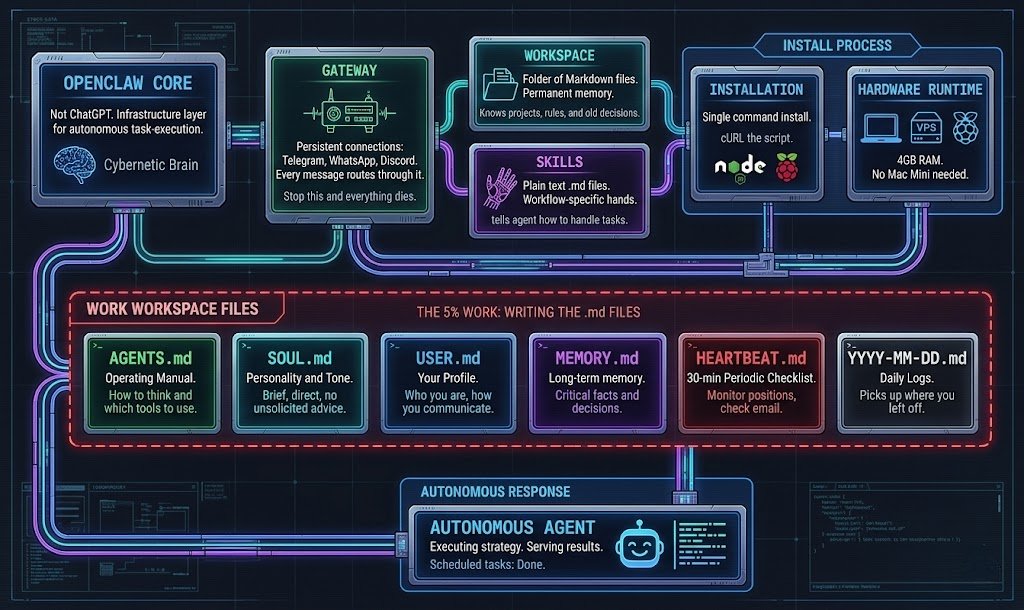
Zero of these files ship configured. All of them need to be written by you. That's why most installs run at 5%.
Obsidian as permanent agent memory.
The problem with standard agent memory: it's a black box. Data saved as vectors - numbers you can't read, audit, or trust.
The fix - point OpenClaw's workspace at an Obsidian vault. All conversations, decisions, and outputs save as readable Markdown files. Obsidian builds the knowledge graph automatically.
By week 4-5 something shifts. The agent stops answering generically and starts referencing your actual past decisions. It finds connections between a note from six months ago and what you're asking today.
Configure it once in openclaw.json- replace the default memory block with the path to your Obsidian folder. Every session now writes directly into your vault. Just files you can open and read.
Skills that should be installed immediately.
Skills are what turn OpenClaw from a bot into a system. Each one is a .md file with a plain-language instruction set. No code.
The ones worth installing first:
Daily briefing - every morning at 8:30, agent scans your tasks, calendar, and open positions. Sends a summary to Telegram before you ask.
Research filter - give it a list of channels or a topic. Returns only what's worth reading. Cuts 80% of daily noise.
Meeting summary - drop a transcript, get: main point, key decisions, action items. 30 seconds instead of re-reading an hour-long call.
/tldr - after any long brainstorm session, distills the entire conversation into conclusions and next steps. Saves as a clean note automatically.
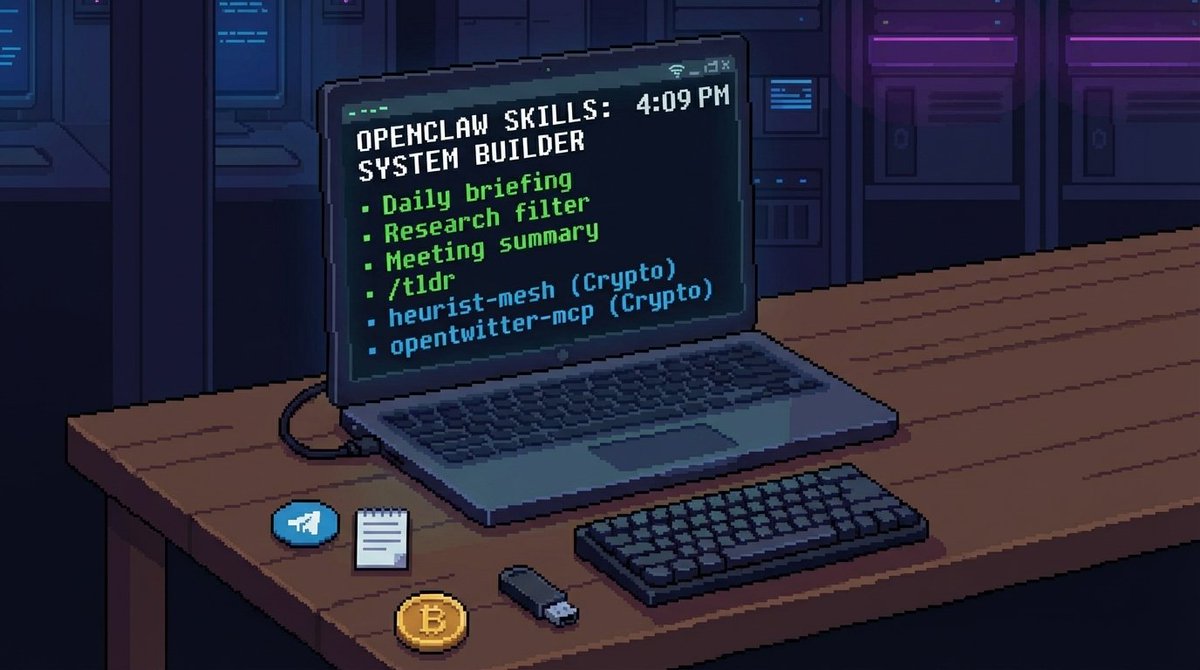
Build your own: create a .md file, write the instruction in plain language, drop it in ~/.openclaw/skills/. Agent picks it up on the next session. The only limit is how clearly you can explain what you want.
Two crypto skills that change the research workflow.
heurist-mesh pulls DexScreener, CoinGecko, GoPlus, and Twitter/X into one interface. 70% fewer tool calls. Up to 50% token savings versus hitting each API separately.
opentwitter-mcp handles everything Twitter/X - profiles, search, feeds, KOL followers. Scraping and analysis in one command.
Free API with no rate limit anxiety: Groq.
Running OpenClaw on paid API tokens burns fast. Every request reloads the entire workspace into context. Heavy usage on Claude or GPT-4 costs real money and hits limits mid-workflow.
Groq hosts the best open-source models - Llama, Mistral, Gemma and provides free API access with industry-leading inference speed. Fastest token generation available. Free tier is generous enough for most daily automation workflows.
Connect it in openclaw.json as a third model layer: expensive models for complex reasoning, local models for background tasks, Groq for everything in between that needs speed without cost.
Add it to ~/.openclaw/.env:Get the key at groq.com
GROQ_API_KEY=your_key_here
Assign it to specific cron jobs and background tasks. Your paid API quota stays intact for work that actually needs it.
A Polymarket bot in 10 minutes. No code.
Pre-built Polymarket skills wrap the entire official API - authentication, endpoints, order validation, retries, caching - into tools the agent can call directly.
The architecture: OpenClaw -> skill -> Polymarket API.
You dont touch the API. The skill handles it. You write the strategy logic on top: when to enter, what limits to set, how to manage risk.
Install polymarket-mcp-server - it provides ready-made tools: getMarkets, getOrderBook, placeOrder. The agent calls these as functions based on your instructions in the skill file.
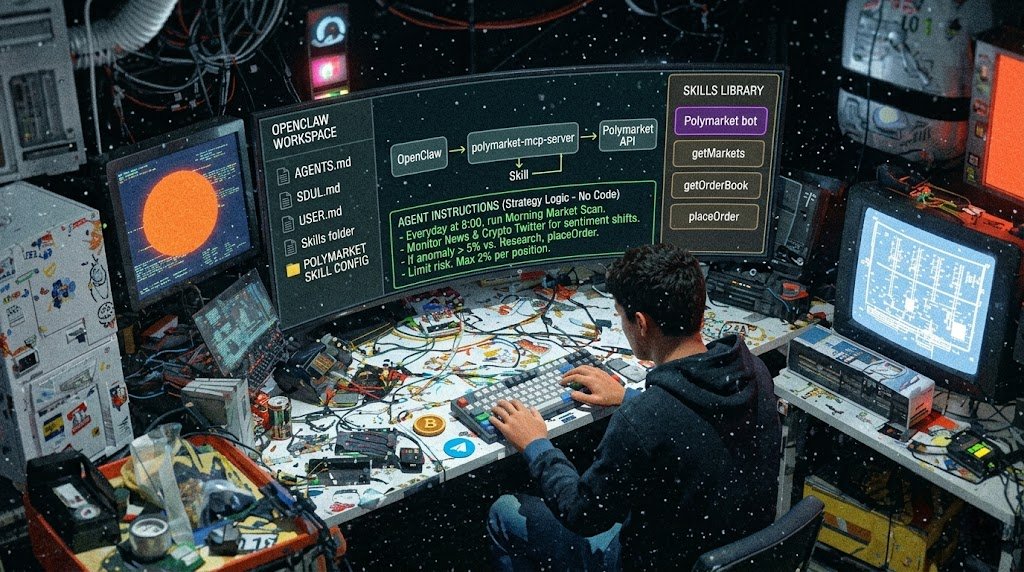
What you can build without writing code:
Sentiment-driven positioning - agent monitors news and Crypto Twitter, identifies narrative shifts, adjusts positions automatically.
Morning market scan - every day at 8:00, agent pulls active markets, finds pricing anomalies against your research scenarios, flags opportunities.
The skill handles the hardware. You write the strategy. That's the entire division of labor.
The system compounds.
Week one: you have a configured agent that knows who you are.
Week four: it stops making the same mistakes. Starts connecting your notes. Runs your morning before you ask.
Month three: the vault has memory. The agent has patterns. The workflow runs itself.
Most people install OpenClaw and stop at Telegram bot. The architecture above is what the other 5% actually build.
Start with one skill. One quick win. Then add the next layer.
Bookmark this. A few hours to set up. Compounds for years.